Friday, September 25, 2009
Arabic Guy on Treadmill - Hilarious
This is a hilarious as a Arabic guy tries to do a treadmill test ....watch this

Wednesday, September 23, 2009
New Innovation by google - Amazing
A mobile device with Touch screen, built in camera, scanner, WiFi, google map (hopefully google earth), google search, image search…
Like this way, when you can see a building through it, it gives you the image search result right on the spot.
Smart Internet search will be able to do with a mobile device in the NEAR future

Choose a building and touch a floor and it tells you more details of the building. You can use it when you want to know a car model, an insect name, what kind of food is served at a restaurant and how much, who built a bridge, etc. etc.

It’s got a scanner built in.

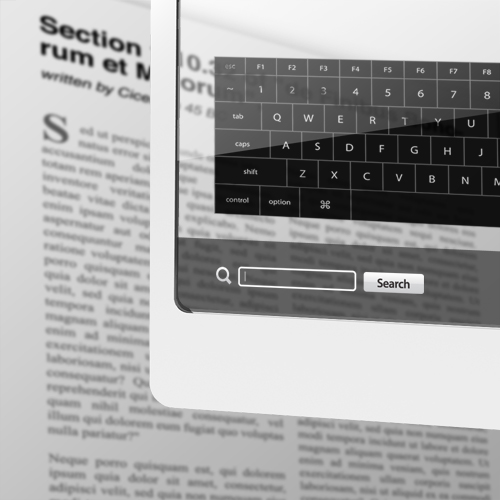
so you can use it this way when you want to check the meaning of a word in the newspaper, book, magazine, etc. It would be much easier to read a real book. You can use the dictionary, wikipedia, thesaurus and anything else available on the web. What do you think?

Indoor guide:Works in a building, airport, station, hospital, etc.

Automatic simultaneous translation: here Latin to English.
Search keyword: Helpful when you want to find out a word from a lot of text in newspaper/book.

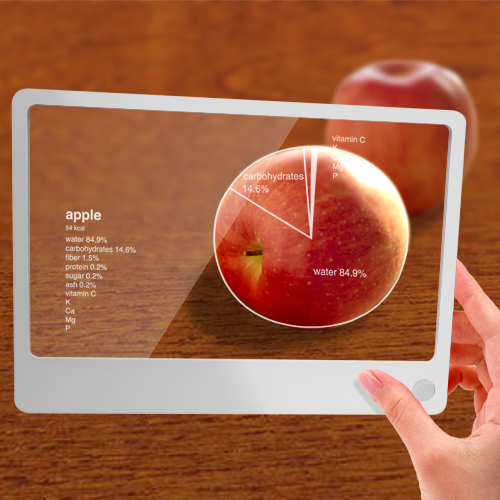
Nutrition: This kind of function would be helpful for health freaks..
Getting data of a weather forecast, maybe this might be possible.

AMAAAZZZINGGGGGGGG RIGHT?????
Friday, September 18, 2009
Santa and Banta - Strikes back
Santa and Banta went for a drive.
Interviewer: Why did you changed your last job?
Santa: Because the company shifted and didn't tell me where.
Santa: Hey, look out from the window, are the indicators working or not?
Banta puts his head out & says "Yes-No, Yes-No, Yes-No, Yes-No!!!"
Banta puts his head out & says "Yes-No, Yes-No, Yes-No, Yes-No!!!"
Interviewer: Why did you changed your last job?
Santa: Because the company shifted and didn't tell me where.
Santa opened a petrol pump, but not even one
customer went there. You know why? Because he opened petrol pump on second floor..
customer went there. You know why? Because he opened petrol pump on second floor..
A lady calls Santa for repairing door bell.
Santa doesn't turns up for 4 days.
Lady calls again, Santa replies: I'm coming daily since 4 days, I press the bell but no one comes out.
Lady to inspector Santa: My husband went to buy potatos 5
days ago, he hasn't came back yet! Santa: Why don't u cook something else? .
Santa doesn't turns up for 4 days.
Lady calls again, Santa replies: I'm coming daily since 4 days, I press the bell but no one comes out.
Lady to inspector Santa: My husband went to buy potatos 5
days ago, he hasn't came back yet! Santa: Why don't u cook something else? .
Thursday, September 17, 2009
fastflip.googlelabs.com
Fast Flip is Google’s attempt to present recent news, headlines, and popular articles like a printed magazine stand. You can browse screenshot thumbnails of stories from your favorite publishers, authors or topics. The system currently features pages from several dozen (mostly) US-based news corporations but more will be added over time.
Wednesday, September 16, 2009
Wifi Electricity
Can we transfer the electricity remotley. Yes ofcourse,,,In this video we can see the how the electricty is transferred wifi .....i mean without plugs.....
Tuesday, September 15, 2009
Operation Entebee....A Real Incident
Operation Entebbe, was a counter-terrorism hostage-rescue mission carried out by theIsrael Defense Forces (IDF) at Entebbe Airport in Uganda on the night of 3 July and early morning of 4 July 1976.[1]
In the wake of the hijacking of Air France Flight 139 by members of the militant of the Popular Front for the Liberation of Palestine and the hijackers' threats to kill the hostages if their prisoner release demands were not met, a plan was drawn up to airlift the hostages to safety.
You can say that this is similar to the "Kandhar incident" of india.....The only difference
being Israeli forces killed the terrorists and rescued their countrymen....India left
theTerrorists....
Highlights
1. Flying at a height of no more than 30 m (100 feet) to avoid radar detection by Egyptian, Sudanese, and Saudi Arabian forces.
2. Landed at the Entebbe airport in the middle of teh night....without any lights in the runway....
3. Four C-130s planes were flown from israel to uganda secretly.
4. On arriving at the airport the commandoes came in a mercedes benz...mimicing ugandas presidents return from overseas.....
Watch videos Here from the documentary of national geographic
Monday, September 14, 2009
Steve Jobs speech @ Stannford - Inspiring
Here we see Steve Jobs delivering his commencement speech to the graduates of Stanford University in 2005. In it he talks about getting fired from Apple in 1985, and about life & death.
This is a must listen for all teh enw young enterprenuers...
Friday, September 11, 2009
Did Aircrafts existed 1000 yeras before.....
The Vaimānika Shāstra वैमानिक शास्त्र ("Science of Aeronautics" also Vimanika, Vymanika) is an early 20th century Sanskrit text on aeronautics obtained by so-called "mental channeling", about construction of vimānas, the "chariots of the Gods", mythical self-moving aerial cars mentioned in the Sanskrit epics.......

More on this can be found in this path....
Wednesday, September 09, 2009
Santa and Banta Strike Again.....
Titanic was sinking.
An Englishman asked Santa, "How far is land"?
Santa: 2 KMs.
Englishman jumped into sea.
Englishman: Now, which direction?
Santa: Downwards !
Santa falls in love with a nurse... After much thinking,
he finally writes a love letter to her:
"I luv u sister ."
An Englishman asked Santa, "How far is land"?
Santa: 2 KMs.
Englishman jumped into sea.
Englishman: Now, which direction?
Santa: Downwards !
Two days of powercut in Delhi had made life miserable.
Worst affected was Delhi Metro station where families
of Santa & Banta were struck for 48 hrs on escalators.
Worst affected was Delhi Metro station where families
of Santa & Banta were struck for 48 hrs on escalators.
Santa: I have swallowed a Key.
Doctor: When?
Santa: 3 months back!
Doctor: What were you doing till now?
Santa: I was using duplicate key,
now I have lost it too.
Doctor: When?
Santa: 3 months back!
Doctor: What were you doing till now?
Santa: I was using duplicate key,
now I have lost it too.
Santa falls in love with a nurse... After much thinking,
he finally writes a love letter to her:
"I luv u sister ."
Santa asked Banta: Why Manmohan Singh goes for
a walk in evening?
Banta: Very simple, because he is PM not AM.
a walk in evening?
Banta: Very simple, because he is PM not AM.
An Englishman and Santa inside the toilet.
Englishman: Good evening, how do u do?
Santa: Good evening, we open the zip and do!
Englishman: Good evening, how do u do?
Santa: Good evening, we open the zip and do!
Tuesday, September 08, 2009
SMS Jokes
Teacher:-What is common between KRISHNA,GANDHI& JESUS...?
SARDAR replied...."ALL ARE bOrN ON GOVERMENT Holiday
if you call your mother as MUM... What will you call Mother's younger
sis and elder sis? Answer : MINMUM & MAXIMUM
SARDAR replied...."ALL ARE bOrN ON GOVERMENT Holiday
if you call your mother as MUM... What will you call Mother's younger
sis and elder sis? Answer : MINMUM & MAXIMUM
Do you ever notice that when you're driving, anyone going slower than you is an idiot and everyone driving faster than you is a maniac?
===============================
Rahul's Dad brought home a robot one day.
The robot had the ability to detect lies and would slap the person who lied.
Rahul returned late from school.
Dad asked, "Son why are you late from school?"
"Dad, we had extra classes today".
Robot slapped Rahul on his face.
Dad shouted, "Come on tell me the truth, why are you late?"
"Dad, I went to see the movie Ten Commandments."
Robot slapped Rahul on his face.
Sorry dad, I went to see the movie "Chameli Ki Jawaani".
"Shame on you son, when I was your age, I never watched obscene movies or misbehaved."
Immediately, Dad gets a slap on the face from the robot.
Rahul's mom comes walking out of the kitchen and says to her husband, "After all, he's your son!"
The robot slaps the mom.
The robot had the ability to detect lies and would slap the person who lied.
Rahul returned late from school.
Dad asked, "Son why are you late from school?"
"Dad, we had extra classes today".
Robot slapped Rahul on his face.
Dad shouted, "Come on tell me the truth, why are you late?"
"Dad, I went to see the movie Ten Commandments."
Robot slapped Rahul on his face.
Sorry dad, I went to see the movie "Chameli Ki Jawaani".
"Shame on you son, when I was your age, I never watched obscene movies or misbehaved."
Immediately, Dad gets a slap on the face from the robot.
Rahul's mom comes walking out of the kitchen and says to her husband, "After all, he's your son!"
The robot slaps the mom.
======================================
Monday, September 07, 2009
Future Operating System of Micrsoft - Windows 7

The new operating system of microsoft windows 7 a sthe following features,,,,Its a touch screen based operating system...
Sunday, September 06, 2009
Wht is a DNA ?

DNA is an abbreviation of Deoxyribo Nucleic Acid, a for live very important molecule. A DNA molecule consists of two long strands that twist around eachother like a spiral staircase. That is why the molecule is called a double helix. Each strand consists of the backbone of ribose (a sugar) together with phosphate groups and nitrogen bases.
There are 4 different nitrogen bases: Adenine (A), Thymine (T), Cytosine (C) and Guanine (G). These bases are often called after their first letter. The A in a strand can form bonds with the T in the opposite strand and the G can form bonds with the C. They form basepairs. This is why the strands are always each others mirror image, each others complement. They are called complementary strands:
ATGCGTGCAATGTTTACGCGTAAAGCGTGCACGTTAGAGTACGTGCAGT
|||||||||||||||||||||||||||||||||||||||||||||||||
TACGCACGTTACAAATGCTCATTTCGCACGTGCAAGCTCATGCACGTCA
The order in which the bases are present in the DNA forms a code which determines genetic information. Like notes on a piece of music form a melody, the letters A, C, G and T for the foundation of genetic properties. So despite there are only 4 code letters, the possible lettercombinations of a piece of DNA of just hundred of these basepairs is very large. And when considering the fact that the human DNA consists of 6 million basepairs, DNA is very unique for a person.
|||||||||||||||||||||||||||||||||||||||||||||||||
TACGCACGTTACAAATGCTCATTTCGCACGTGCAAGCTCATGCACGTCA
The order in which the bases are present in the DNA forms a code which determines genetic information. Like notes on a piece of music form a melody, the letters A, C, G and T for the foundation of genetic properties. So despite there are only 4 code letters, the possible lettercombinations of a piece of DNA of just hundred of these basepairs is very large. And when considering the fact that the human DNA consists of 6 million basepairs, DNA is very unique for a person.
Friday, September 04, 2009

Thursday, September 03, 2009
20 things you didn't know about Windows XP
(Some of this commands should be executed @ caution....be careful and take advice if necessary)
1. You can delete files immediately, without having them move to the Recycle Bin first. Go to the Start menu, select Run... and type 'gpedit.msc'; then select User Configuration, Administrative Templates, Windows Components, Windows Explorer and find the Do not move deleted files to the Recycle Bin setting. Set it. Poking around in gpedit will reveal a great many interface and system options, but take care -- some may stop your computer behaving as you wish. (Professional Edition only).
2. It boasts how long it can stay up. Whereas previous versions of Windows were coy about how long they went between boots, XP is positively proud of its stamina. Go to the Command Prompt in the Accessories menu from the All Programs start button option, and then type 'systeminfo'. The computer will produce a lot of useful info, including the uptime. If you want to keep these, type 'systeminfo > info.txt'. This creates a file called info.txt you can look at later with Notepad. (Professional Edition only).
3. You can lock your XP workstation with two clicks of the mouse. Create a new shortcut on your desktop using a right mouse click, and enter 'rundll32.exe user32.dll,LockWorkStation' in the location field. Give the shortcut a name you like. That's it -- just double click on it and your computer will be locked. And if that's not easy enough, Windows key + L will do the same.
4. XP hides some system software you might want to remove, such as Windows Messenger, but you can tickle it and make it disgorge everything. Using Notepad or Edit, edit the text file /windows/inf/sysoc.inf, search for the word 'hide' and remove it. You can then go to the Add or Remove Programs in the Control Panel, select Add/Remove Windows Components and there will be your prey, exposed and vulnerable.
5. For those skilled in the art of DOS batch files, XP has a number of interesting new commands. These include 'eventcreate' and 'eventtriggers' for creating and watching system events, 'typeperf' for monitoring performance of various subsystems, and 'schtasks' for handling scheduled tasks. As usual, typing the command name followed by /? will give a list of options -- they're all far too baroque to go into here.
6. XP has IP version 6 support -- the next generation of IP. Unfortunately this is more than your ISP has, so you can only experiment with this on your LAN. Type 'ipv6 install' into Run... (it's OK, it won't ruin your existing network setup) and then 'ipv6 /?' at the command line to find out more. If you don't know what IPv6 is, don't worry and don't bother.
7. You can at last get rid of tasks on the computer from the command line by using 'taskkill /pid' and the task number, or just 'tskill' and the process number. Find that out by typing 'tasklist', which will also tell you a lot about what's going on in your system.
8. XP will treat Zip files like folders, which is nice if you've got a fast machine. On slower machines, you can make XP leave zip files well alone by typing 'regsvr32 /u zipfldr.dll' at the command line. If you change your mind later, you can put things back as they were by typing 'regsvr32 zipfldr.dll'.
9. XP has ClearType -- Microsoft's anti-aliasing font display technology -- but doesn't have it enabled by default. It's well worth trying, especially if you were there for DOS and all those years of staring at a screen have given you the eyes of an astigmatic bat. To enable ClearType, right click on the desktop, select Properties, Appearance, Effects, select ClearType from the second drop-down menu and enable the selection. Expect best results on laptop displays. If you want to use ClearType on the Welcome login screen as well, set the registry entry HKEY_USERS/.DEFAULT/Control Panel/Desktop/FontSmoothingType to 2.
10. You can use Remote Assistance to help a friend who's using network address translation (NAT) on a home network, but not automatically. Get your pal to email you a Remote Assistance invitation and edit the file. Under the RCTICKET attribute will be a NAT IP address, like 192.168.1.10. Replace this with your chum's real IP address -- they can find this out by going to www.whatismyip.com -- and get them to make sure that they've got port 3389 open on their firewall and forwarded to the errant computer.
11. You can run a program as a different user without logging out and back in again. Right click the icon, select Run As... and enter the user name and password you want to use. This only applies for that run. The trick is particularly useful if you need to have administrative permissions to install a program, which many require. Note that you can have some fun by running programs multiple times on the same system as different users, but this can have unforeseen effects.
12. Windows XP can be very insistent about you checking for auto updates, registering a Passport, using Windows Messenger and so on. After a while, the nagging goes away, but if you feel you might slip the bonds of sanity before that point, run Regedit, go to HKEY_CURRENT_USER/Software/Microsoft/Windows/Current Version/Explorer/Advanced and create a DWORD value called EnableBalloonTips with a value of 0.
13. You can start up without needing to enter a user name or password. Select Run... from the start menu and type 'control userpasswords2', which will open the user accounts application. On the Users tab, clear the box for Users Must Enter A User Name And Password To Use This Computer, and click on OK. An Automatically Log On dialog box will appear; enter the user name and password for the account you want to use.
14. Internet Explorer 6 will automatically delete temporary files, but only if you tell it to. Start the browser, select Tools / Internet Options... and Advanced, go down to the Security area and check the box to Empty Temporary Internet Files folder when browser is closed.
15. XP comes with a free Network Activity Light, just in case you can't see the LEDs twinkle on your network card. Right click on My Network Places on the desktop, then select Properties. Right click on the description for your LAN or dial-up connection, select Properties, then check the Show icon in notification area when connected box. You'll now see a tiny network icon on the right of your task bar that glimmers nicely during network traffic.
16. The Start Menu can be leisurely when it decides to appear, but you can speed things along by changing the registry entry HKEY_CURRENT_USER/Control Panel/Desktop/MenuShowDelay from the default 400 to something a little snappier. Like 0.
17. You can rename loads of files at once in Windows Explorer. Highlight a set of files in a window, then right click on one and rename it. All the other files will be renamed to that name, with individual numbers in brackets to distinguish them. Also, in a folder you can arrange icons in alphabetised groups by View, Arrange Icon By... Show In Groups.
18. Windows Media Player will display the cover art for albums as it plays the tracks -- if it found the picture on the Internet when you copied the tracks from the CD. If it didn't, or if you have lots of pre-WMP music files, you can put your own copy of the cover art in the same directory as the tracks. Just call it folder.jpg and Windows Media Player will pick it up and display it.
19. Windows key + Break brings up the System Properties dialogue box; Windows key + D brings up the desktop; Windows key + Tab moves through the taskbar buttons.
20. The next release of Windows XP, codenamed Longhorn, is due out late next year or early 2003 and won't be much to write home about. The next big release is codenamed Blackcomb and will be out in 2003/2004.
Wednesday, September 02, 2009
Deadlock Situation :-)

Boss said to secretary: For a week we will go abroad,
so make arrangement.
Secretary make call to Husband: For a week my boss and
I will be going abroad, you look after yourself.
Husband make call to secret lover: My wife is going
abroad for a week, so lets spend the week together.
Secret lover make call to small boy whom she is giving
private tution: I have work for a week, so you need
not come for class.
Small boy make call to his grandfather: Grandpa, for a
week I don't have class 'coz my teacher is busy. Lets
spend the week together.
Grandpa(the 1st boss ;) ) make call to his secretary: This week I am
spending my time with my grandson. We cannot attend
that meeting.
Secretary make call to her husband: This week my boss
has some work, we cancelled our trip.
Husband make call to secret lover: We cannot spend
this week together, my wife has cancelled her trip.
Secret lover make call to small boy whom she is giving
private tution: This week we will have class as usual.
Small boy make call to his grandfather: Grandpa, my
teacher said this week I have to attend class. Sorry I
can't give you company.
Grandpa(boss) make call to his secretary: Don't worry this
week we will attend that meeting, so make arrangement .
|
|
|
|
Tuesday, September 01, 2009
Avatar - The First 3D movie.....From James Cameroon

Ever thinking what happened to James Cameroon the Titanic Director.......After Titanic there was not even a single movie being released by this director......SO after 14 years after titanic he comes again with a first 3D movie called Avatar....
This movie is shot using Fusion digital 3-D camera system. With an estimated budget of $237 million, Avatar is currently the fourth most expensive film ever.....
THis is a complete out of the experience as this is the first complete 3D movie....all the characters are picturized in 3D ...
The release of this film willl be on dec 18.....the release was supposed to be in july and postponed to give more time for theaters worldwide to install 3D projectors.........
The trailer of the movie below may look simple.But actually when it is viewed in a 3D projector ...it will be mindblowing....
Subscribe to:
Posts (Atom)


 Posts
Posts


